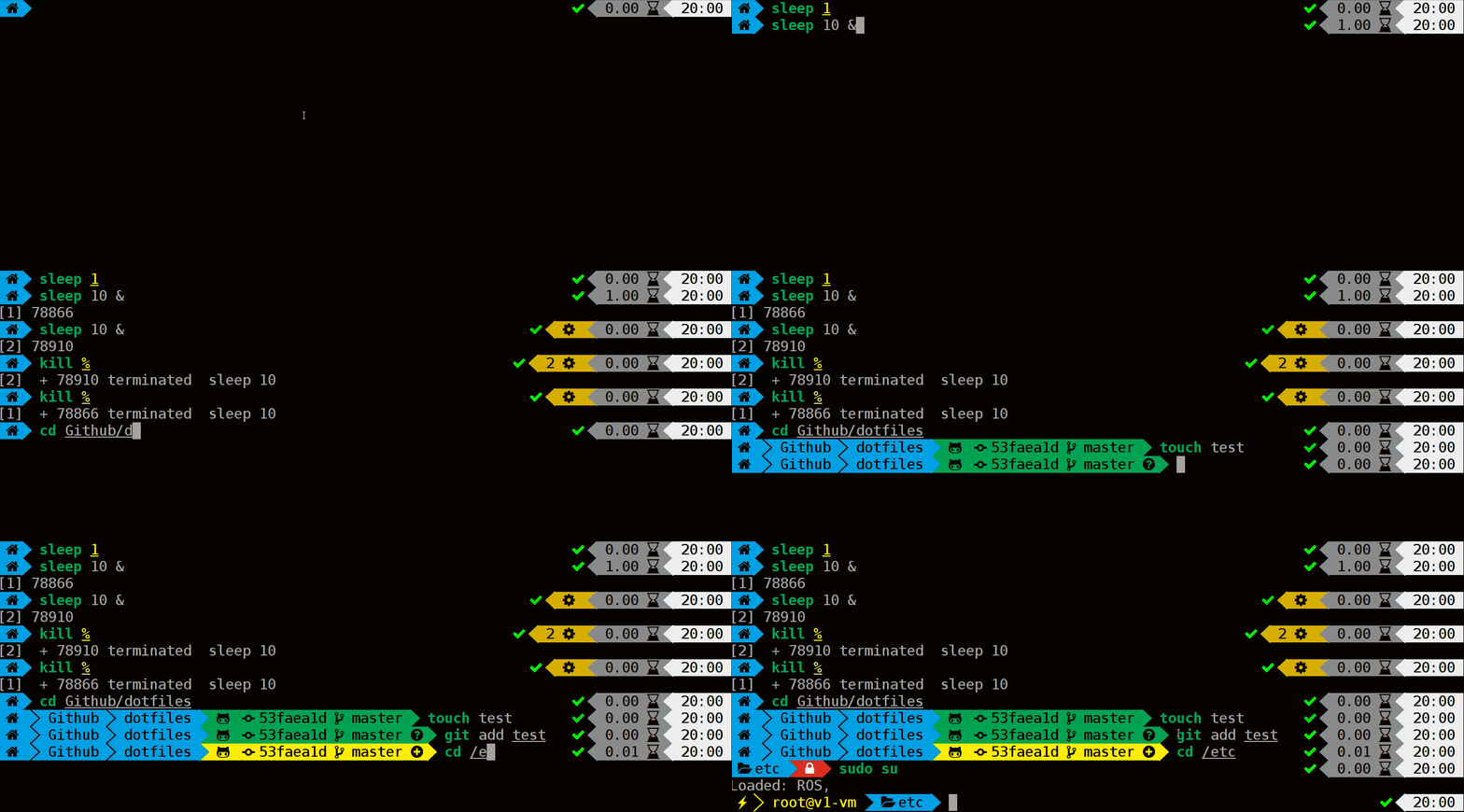
本文基于macOS最佳实践,所展示的配置动图来自Powerlevel9k (opens new window)主题官方
# 安装载体:Zsh
Zsh是一款功能强大终端(shell)软件,既可以作为一个交互式终端,也可以作为一个脚本解释器。它在兼容 Bash 增强效率的同时还提供插件支持实现更多可能。
通过如下命令查看本机所有 shell ,macOS 自带 Zsh 无需再安装
cat /etc/shells
基于 Debian 的 Linux(WSL)发行版可通过如下命令安装
apt install zsh
设置 Zsh 为默认 shell
未默认安装的 Zsh 根据用户实际路径设置
chsh -s /bin/zsh
# 安装配置管理工具:Antigen (opens new window)
# macOS
brew install antigen
用vim ~/.zshrc 编辑配置
source /usr/local/share/antigen/antigen.zsh
# Debian
apt install zsh-antigen
用vim ~/.zshrc 编辑配置
source /usr/share/zsh-antigen/antigen.zsh
# 主题:Powerlevel9k (opens new window)
# 安装Powerline字体
macOS 通过 Homebrew
先执行第一个指令,才能用 Homebrew 安装字型。曾经执行过的人可以跳过第一个指令
brew tap homebrew/cask-fonts
brew cask install font-sourcecodepro-nerd-font
Linux 或 WSL 通过 curl(方式多样,不作过多介绍)
 mkdir -p ~/.local/share/fonts
 cd ~/.local/share/fonts && curl -fLo "Droid Sans Mono for Powerline Nerd Font Complete.otf" https://github.com/ryanoasis/nerd-fonts/raw/master/patched-fonts/DroidSansMono/complete/Droid%20Sans%20Mono%20Nerd%20Font%20Complete.otf
在终端中设置刚才下载的字体
# 主题配置
用vim ~/.zshrc编辑配置
通过 Antigen 管理主题
antigen theme bhilburn/powerlevel9k powerlevel9k
字体设为 Nerd-Fonts , Linux 忽略此处配置
POWERLEVEL9K_MODE='nerdfont-complete'
个性配置: 左侧
POWERLEVEL9K_LEFT_PROMPT_ELEMENTS=(context dir dir_writable vcs vi_mode)
右侧
POWERLEVEL9K_RIGHT_PROMPT_ELEMENTS=(status background_jobs history ram load time)
若当前登入的帐號为你的帐號 xxx,就不用特別显示出来
DEFAULT_USER="xxx"
# 插件推荐
# zsh-syntax-highlighting
设置语法高亮
antigen bundle zsh-users/zsh-syntax-highlighting
# zsh-autosuggestions
设置输入命令时给出建议
antigen bundle zsh-users/zsh-autosuggestions
调整显示亮度,默认太暗
ZSH_AUTOSUGGEST_HIGHLIGHT_STYLE='fg=10'
# 完整配置
source /usr/local/share/antigen/antigen.zsh
# Load the oh-my-zsh's library.
antigen use oh-my-zsh
# Bundles from the default repo (robbyrussell's oh-my-zsh).
antigen bundle git
antigen bundle brew
antigen bundle zsh-users/zsh-syntax-highlighting
antigen bundle zsh-users/zsh-autosuggestions
# Load the theme.
# antigen theme powerlevel9k
antigen theme bhilburn/powerlevel9k powerlevel9k
POWERLEVEL9K_MODE='nerdfont-complete'
POWERLEVEL9K_LEFT_PROMPT_ELEMENTS=(context dir dir_writable vcs vi_mode)
POWERLEVEL9K_RIGHT_PROMPT_ELEMENTS=(status root_indicator background_jobs ram load time)
# 让命令主体单独在第二行显示
POWERLEVEL9K_PROMPT_ON_NEWLINE=true
# 命令前部字符的配置
POWERLEVEL9K_MULTILINE_FIRST_PROMPT_PREFIX="╭"
POWERLEVEL9K_MULTILINE_LAST_PROMPT_PREFIX="╰\u276F\u276F\u276F "
# 隐藏默认用户名
DEFAULT_USER="xxx"
ZSH_AUTOSUGGEST_HIGHLIGHT_STYLE='fg=10'
# Tell Antigen that you're done.
antigen apply